PURPOSE OF THIS THREAD
I receive many inquiries about the JB4; from how it works, how to install it and how to use all its myriad features. Those of you that have made contact with me will know that I try my best to assist. Most of the inquiries on the JB4 seems to be from registered members who are not active on the forum but is interested to try it out. But I feel this support thread will assist (all of us) using this amazing tune.
There is a dedicated [N54 Tech Forum] that deals with the JB4 only, but I still find people saying they dont understand all the technical jargon and seemingly complicated install and tuning processes.
WHY THE JB4?
Revo and I have a long relationship with the JB4 (Juicebox) from its inception and have experienced how the tuning company & its tune has grown, progressed and advance over the years.
Yes, I have used and experimented with the Procede as well during its early development up untill 2010 interchangably with the JB 2 & 3 (at the time) when I decided to use only one tune and devoted my time to promote the JB4.
I also hope that this thread will be about the JB4 and not about the JB4 vs all the others. You can search the Net for answers or read the useful N54 Tune Comparison Chart (Pdf) attached at the bottom of this post.
WHAT IS THE JB4?
* The JB4 is a piggyback tune. The JB4 is an upgrade to the JB3 that replaces it's control box with a new much more technically capable box. The new box features 5x the processing power, 2x the memory, better signal conditioning, a more robust power supply, integrated CAN communications, and additional inputs and outputs for future use. CAN specifically is the largest improvement allowing access to hundreds of new parameters, commands, and potential tuning features. In place so far on the alpha are in dash gauges, shift light, built in code reading/deleting, steering wheel controls, on the fly map switching with confirmation, a completely new CAN based boost control system, cold oil protection, built in DPFIX, etc.
* Additional features have recently been added such as autotuning to optimize power and safety on an ongoing basis, drag launch mode, adaptive PID to optimize boost targeting, progressive meth mapping, progressive Nitrous mapping and many more to come.
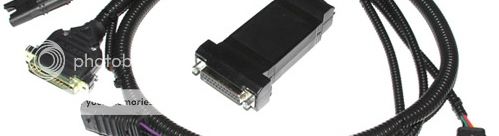
* The JB4 software is updated regularly and can be uploaded (for free). To update your JB4 you will need a special USB cable. We will try to alert you to those critical updates on this thread.
WHAT WILL THIS THREAD INCLUDE?
This thread MUST be about practical and usefull support for those using the tune or those that are interested to use it. In this thread we want to deal with the product features, installation and tuning related questions you may have. Datalogging, reading & deleting codes as well as custom tuning concerns. We should feel free to discuss here.
* I also hope that we will share our experiences with the JB4 and our special tuning settings. Tell us what works for you in your province. We know that the tuning needs of the JB4 users at the coast is different to those at altitude. Lets share these experiences.
WHO WILL ANSWER ALL THE QUESTIONS?
Definitely not me. Lets see this thread as a JB4 community enthusiast thread where we can ALL PARTICIPATE and respond to queries, questions or concerns. There will be no "wrong" or "irrelevant" questions and at the same time we will all try to respond to questions accurately and if we dont have the answer we will "revert" with an answer from the manufacturer of the JB4.
So lets start with the following information:
JB4 N54 INFO & FEATURES:
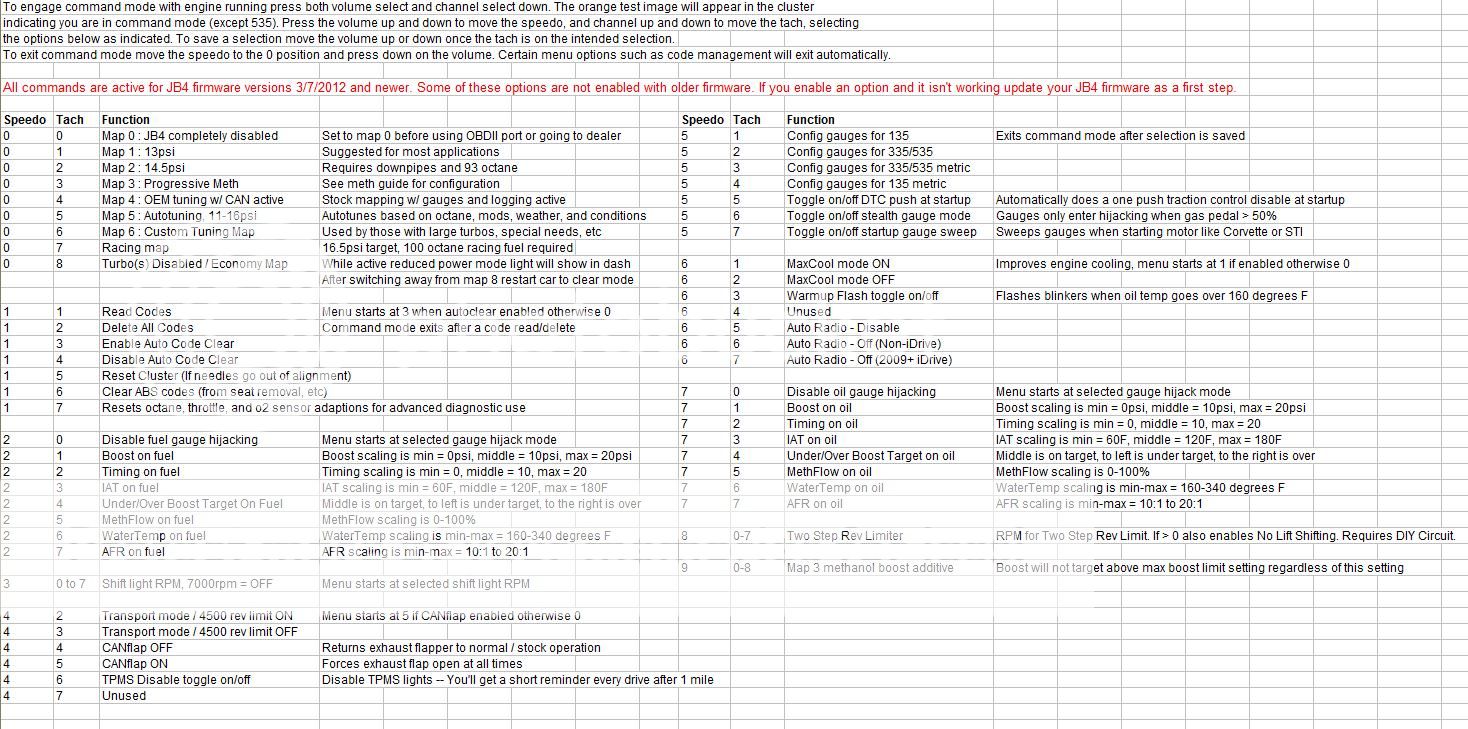
1. This diagramme explains the various maps of the JB4 for the N54 motor as well as all the features that can be accessed using the steering wheel controls:
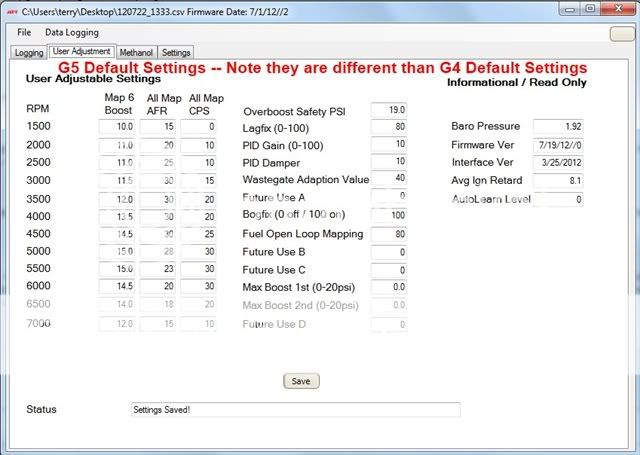
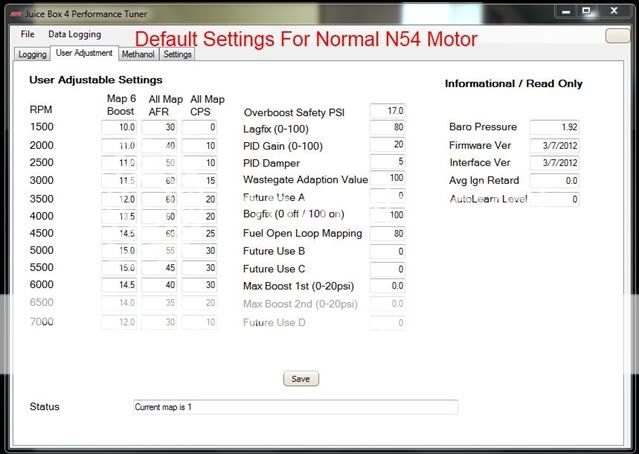
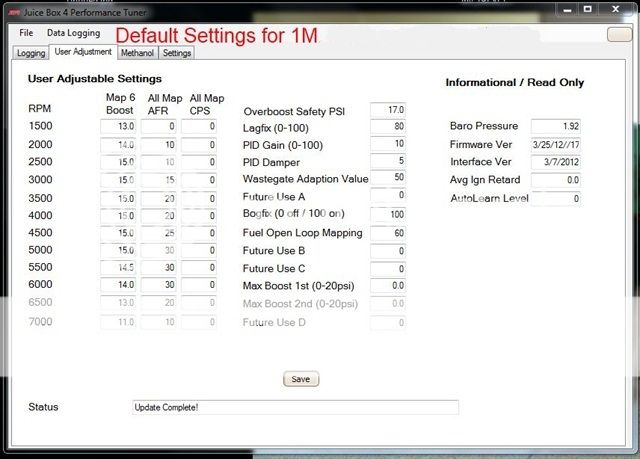
2. This diagramme will be a familiar interface for JB4 users. You can access your JB4 using a laptop with the special USB cable and use the various settings within the interface to communicate with the JB4.
3. Within the interface (below) you can read/delete codes. With the JB4 you do NOT need an additional scan tool for trouble shooting codes. But some users prefer to use the following scan tool - See my review here: [Bavarian Technic BMW & Mini Diagnostic OBD Tool]
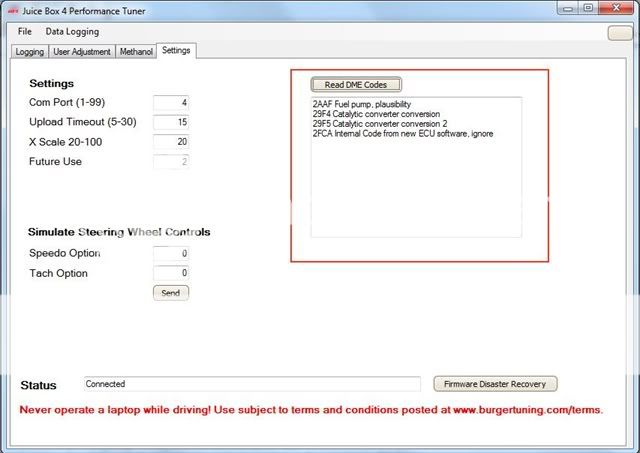
The settings diagramme above has been updated recently to include:
* Added drop down under settings for engine type. To be used for engine specific variables and settings. Default is N54. Other options include N55 and N54-1M/335is. Select the appropriate setting in the drop down for proper interface operation.
* Automatic setting updates during firmware updates. This can be blocked by checking off "Do Not Reset Settings When Uploading Firmware".
JB4 N55 STAGE 2 INFO & FEATURES:
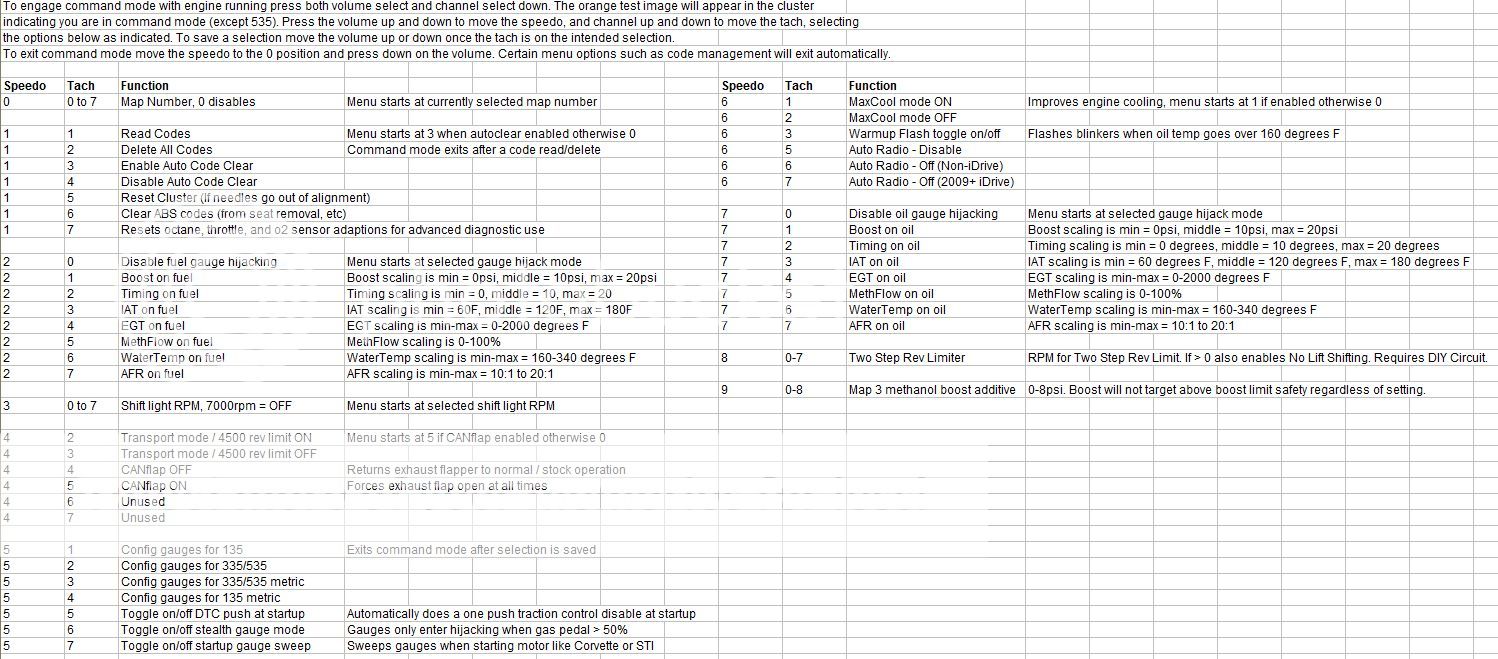
1. The diagramme below explains the various maps of the JB4 for the N55 motor as well as all the features that can be accessed using the steering wheel controls:
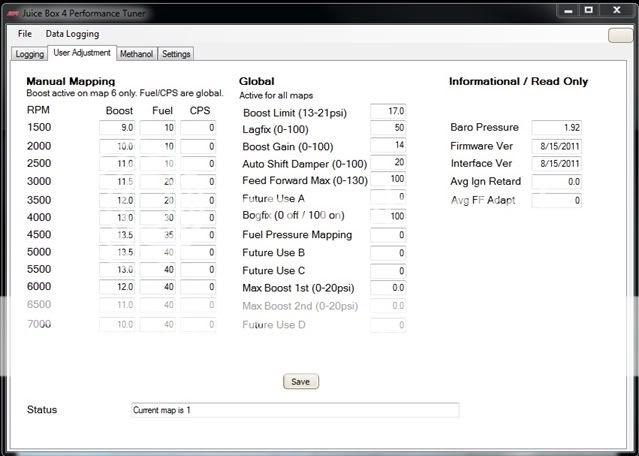
2. You can access your JB4 using a laptop with the special USB cable and use the various settings within the interface to communicate with the JB4.
RENNZPORT
Needless to say Rennzport is a reseller of the JB4 amongst many other products from the same supplier. We are not anti-software/chip tuning. We offer the JB4 as a piggyback tune as an alternative to software/chiptuning - thats all.
Warning: Be careful when you buy the JB4 second-hand or from ebay or a friend. The JB4 can be modified for more power. We have seen some atrocious modifications to the JB4 including cut and split wires. Rather buy from a reputable distributor of the JB4 then you are assured; if there is in the (unlikely) event a product defect; that you will get the necessary service support.
We can only encourage fanatics members to support Rennzport and be proudly South African in support to a local business.
Now let the support begins.
You can download the latest JB4 interface & firmare software directly from the links below. Right Click and Save Target As:
N54 MOTOR TWIN TURBOS
8/17 (INTERFACE)
8/21 (FIRMWARE)
N55 MOTOR TWIN POWER
8/17 (INTERFACE)
8/17 (FIRMWARE)
:ty:
I receive many inquiries about the JB4; from how it works, how to install it and how to use all its myriad features. Those of you that have made contact with me will know that I try my best to assist. Most of the inquiries on the JB4 seems to be from registered members who are not active on the forum but is interested to try it out. But I feel this support thread will assist (all of us) using this amazing tune.
There is a dedicated [N54 Tech Forum] that deals with the JB4 only, but I still find people saying they dont understand all the technical jargon and seemingly complicated install and tuning processes.
WHY THE JB4?
Revo and I have a long relationship with the JB4 (Juicebox) from its inception and have experienced how the tuning company & its tune has grown, progressed and advance over the years.
Yes, I have used and experimented with the Procede as well during its early development up untill 2010 interchangably with the JB 2 & 3 (at the time) when I decided to use only one tune and devoted my time to promote the JB4.
I also hope that this thread will be about the JB4 and not about the JB4 vs all the others. You can search the Net for answers or read the useful N54 Tune Comparison Chart (Pdf) attached at the bottom of this post.
WHAT IS THE JB4?
* The JB4 is a piggyback tune. The JB4 is an upgrade to the JB3 that replaces it's control box with a new much more technically capable box. The new box features 5x the processing power, 2x the memory, better signal conditioning, a more robust power supply, integrated CAN communications, and additional inputs and outputs for future use. CAN specifically is the largest improvement allowing access to hundreds of new parameters, commands, and potential tuning features. In place so far on the alpha are in dash gauges, shift light, built in code reading/deleting, steering wheel controls, on the fly map switching with confirmation, a completely new CAN based boost control system, cold oil protection, built in DPFIX, etc.
* Additional features have recently been added such as autotuning to optimize power and safety on an ongoing basis, drag launch mode, adaptive PID to optimize boost targeting, progressive meth mapping, progressive Nitrous mapping and many more to come.
* The JB4 software is updated regularly and can be uploaded (for free). To update your JB4 you will need a special USB cable. We will try to alert you to those critical updates on this thread.
WHAT WILL THIS THREAD INCLUDE?
This thread MUST be about practical and usefull support for those using the tune or those that are interested to use it. In this thread we want to deal with the product features, installation and tuning related questions you may have. Datalogging, reading & deleting codes as well as custom tuning concerns. We should feel free to discuss here.
* I also hope that we will share our experiences with the JB4 and our special tuning settings. Tell us what works for you in your province. We know that the tuning needs of the JB4 users at the coast is different to those at altitude. Lets share these experiences.
WHO WILL ANSWER ALL THE QUESTIONS?
Definitely not me. Lets see this thread as a JB4 community enthusiast thread where we can ALL PARTICIPATE and respond to queries, questions or concerns. There will be no "wrong" or "irrelevant" questions and at the same time we will all try to respond to questions accurately and if we dont have the answer we will "revert" with an answer from the manufacturer of the JB4.
So lets start with the following information:
JB4 N54 INFO & FEATURES:
1. This diagramme explains the various maps of the JB4 for the N54 motor as well as all the features that can be accessed using the steering wheel controls:
2. This diagramme will be a familiar interface for JB4 users. You can access your JB4 using a laptop with the special USB cable and use the various settings within the interface to communicate with the JB4.
3. Within the interface (below) you can read/delete codes. With the JB4 you do NOT need an additional scan tool for trouble shooting codes. But some users prefer to use the following scan tool - See my review here: [Bavarian Technic BMW & Mini Diagnostic OBD Tool]
The settings diagramme above has been updated recently to include:
* Added drop down under settings for engine type. To be used for engine specific variables and settings. Default is N54. Other options include N55 and N54-1M/335is. Select the appropriate setting in the drop down for proper interface operation.
* Automatic setting updates during firmware updates. This can be blocked by checking off "Do Not Reset Settings When Uploading Firmware".
JB4 N55 STAGE 2 INFO & FEATURES:
1. The diagramme below explains the various maps of the JB4 for the N55 motor as well as all the features that can be accessed using the steering wheel controls:
2. You can access your JB4 using a laptop with the special USB cable and use the various settings within the interface to communicate with the JB4.
RENNZPORT
Needless to say Rennzport is a reseller of the JB4 amongst many other products from the same supplier. We are not anti-software/chip tuning. We offer the JB4 as a piggyback tune as an alternative to software/chiptuning - thats all.
Warning: Be careful when you buy the JB4 second-hand or from ebay or a friend. The JB4 can be modified for more power. We have seen some atrocious modifications to the JB4 including cut and split wires. Rather buy from a reputable distributor of the JB4 then you are assured; if there is in the (unlikely) event a product defect; that you will get the necessary service support.
We can only encourage fanatics members to support Rennzport and be proudly South African in support to a local business.
Now let the support begins.
You can download the latest JB4 interface & firmare software directly from the links below. Right Click and Save Target As:
N54 MOTOR TWIN TURBOS
8/17 (INTERFACE)
8/21 (FIRMWARE)
N55 MOTOR TWIN POWER
8/17 (INTERFACE)
8/17 (FIRMWARE)
:ty: