Windows 10

RAArmstrong

///Member
cOlDFuSiOn said:
RAArmstrong@TheFanatics said:
Well I'm upgraded now. One tiny file that was part of a Flight Sim addon that kept screwing me over. Deleted the file and had no further problems with upgrading. I like it so far. Boot times are longer though, but my PC is only ever off if Eskom decides it should go off.

One weird issue I have is that Task Manager shows CPU usage constantly at 100%. However there's no associated performance loss. Bizarre.

Weird.. Is it the system idle process that shows the 100% or is it another process?

Cant seem to pinpoint... However confirmed with CPUZ the CPU was infact idling. Clocks were down at around 1600mhz which is where it idles. I have my flight sim running now which is really CPU intensive and its running better than it ever did on 7 :fencelook:
 

ChefDJ

///Member
Your guys pc's haven't come alive and tried to kill you yet after installing W10? :fencelook:
 

DuckKnuckle

Member
Eon said:
Has anybody upgraded from a pirated version of W7 or W8? Does it work or is it a trap?

It works.

Tested with a cracked but activated copy of windows.

Sent from my SM-N910H using Tapatalk
 

Eon

Member
DuckKnuckle said:
Eon said:
Has anybody upgraded from a pirated version of W7 or W8? Does it work or is it a trap?

It works.

Tested with a cracked but activated copy of windows.

Sent from my SM-N910H using Tapatalk
My W7 is cracked but not activated. How do I activate it?
 

RAArmstrong

///Member
It works :fencelook: however BMWFanatics doesn't condone piracy so we can't entertain this discussion on the open forum :thumbs:

Sent from my D5803 using Tapatalk
 

Eon

Member
RAArmstrong@TheFanatics said:
It works :fencelook: however BMWFanatics doesn't condone piracy so we can't entertain this discussion on the open forum :thumbs:

Sent from my D5803 using Tapatalk
Understood.
 

Sleepa

Member
RAArmstrong@TheFanatics said:
Could perhaps be a driver issue

Just sorted it out this second... Driver issue... updated and all sorted...

If anyone is hesitant about upgrading, I wouldn't be it is worth it!
 

ChefDJ

///Member
So I took the plunge last night and upgraded the laptop to Windows 10, my reasoning being that I had an original copy of 8.1 on already. The home PC will not be upgraded because the 8.1 there is... a little less genuine :mmm:

I do not want another popup coming up in a year's time saying "right, so you upgraded your less-than-genuine 8.1 to 10, now pay us a fee to keep your PC running or we shut you down mofo".

What all settings need tweaking to make 10 optimal? I hear about info leaks and spies and what not. What needs disabling? What need enabling?

And for some reason I cannot set Chrome as default browser. What I did wrong? :thinking:

Thanks
 

Ashiel

Member
ChefDJ@TheFanatics said:
So I took the plunge last night and upgraded the laptop to Windows 10, my reasoning being that I had an original copy of 8.1 on already. The home PC will not be upgraded because the 8.1 there is... a little less genuine :mmm:

I do not want another popup coming up in a year's time saying "right, so you upgraded your less-than-genuine 8.1 to 10, now pay us a fee to keep your PC running or we shut you down mofo".

What all settings need tweaking to make 10 optimal? I hear about info leaks and spies and what not. What needs disabling? What need enabling?

And for some reason I cannot set Chrome as default browser. What I did wrong? :thinking:

Thanks

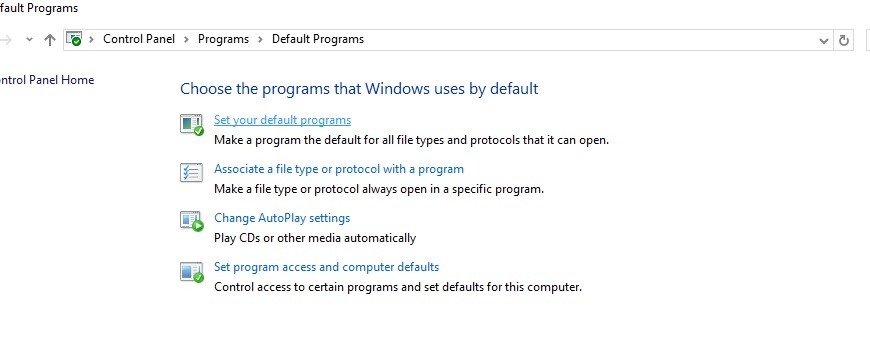
Windows 10 has this stupid idea of setting edge as a PDF Viewer and forcing you to go through the control panel to set your default programs. Also on chrome disable the 'Use prediction service to load pages more quickly. And a good idea to sort out a few of the issues is to run this cmd as an administrator 'sfc /snannow'
default programs_9957114392.jpg
 

ChefDJ

///Member
Came right with the default browser setting.

Also had to go through one moerse rigmarole of getting num lock to activate on startup :shakehead:

So far the laptop is slower. Not very impressed there. Fiddling around to see what's what.
 

VictorMike

///Member
Updated a couple of months ago, from windows 7.

I like it.

Only glitch so far, driver issue with a Gigabyte GeForce 660 GTX.

Otherwise it has been smooth sailing.
 

JG_RSA

New member
ChefDJ@TheFanatics said:
So far the laptop is slower.

Also my experience with the (cheap-ish) HP Pavilion notebook, which I use when traveling, after upgrading to Win10 on it. It was never a speedster with Win8.1, but it is definitely slower with Win10, though it does seem to cold boot up a bit faster. Coming out of hibernation is also not a given anymore - it sometimes just hangs. It also occasionally refuses to connect to WiFi and a restart is needed. Also had issues (which has since been resolved) with sending mail from Outlook.
I tried to upgrade another Dell notebook and it took HOURS after the download seemingly completed and then just froze. When I forcefully restarted it, it booted up with Windows 8.1 and again gave me the opportunity to download Win10, seemingly starting all over. I cancelled it and just let Win8.1 be.

I won't be upgrading any of the other PCs, especially my home office setup. Win8.1 with Start Menu 8 works just fine and if it isn't broken...
I have to say that I have never been a fan of upgrading. I rather prefer a clean install, which isn't an option with the Win10 free upgrade offer (as far as I know).
 

B1gw1ll

///Member
So far I'm enjoying Windows 10 Pro. Just turned off the automatic updates, as I have limited data for internet. I noticed my PC starts up and shuts down much faster than what it did in Windows 7. I'm a fan of arcade emulators like MAME and Nebula, and I'm relieved that they work perfectly in Windows 10 without running it in Compatibility mode. :rollsmile:
 
Top