NFS Shift lagging

Donovan2412

///Member
Hi Guys,

I recently started playing NFS Shift again.

I notice a lot of the time the game is hovering about 40fps (60 is ideal)

It's affecting the racing as i press and it only happens half a second later.

The problem is not my laptop as i play much newer games like Project Cars and they work fine.

I turned all the settings on low and it hardly makes a difference???

It seems to be the other cars slowing the game down (AI)

My Specs:
Lenovo Y50-70
I7 4720HQ @ 2.6Ghz
Nvidia 960M
8GB Ram
Windows 8.1 64 Bit
Plugged in and On high performance mode.
 

Bayn46

Active member
NFS Shift did this too me often - it would run fine for a couple weeks and then randomly drop the fps.

What I found is that the game starts throwing graphics related requests to the cpu, which is obviously extremely inefficient - this also only happened when other cars were on track. What can solve the problem is if you go into your Nvidia control panel and create a specific profile for the game, which seems to force it to run correctly.

Only ever had this with ea games so it's probably just poor design/buggy.
 

MikeR

Well-known member
can I recommend that you double that ram at least you are running 64 bit so it will see it, or bump it all the way to 32 if you can.
theres not much else you can do to the graphics unless you get a new card for it...laptops are weak in that respect, are you at least running it on a cooler pad to get it cooled down a bit.
 

RAArmstrong

///Member
Thats a pretty strong mobile card and the RAM is easily sufficient for NFS Shift. Do what Bayn46 said and create a profile in Nvidia Geforce Experience and let it run on the recommended settings there. See what happens...
 

Donovan2412

///Member
Bayn46 said:
NFS Shift did this too me often - it would run fine for a couple weeks and then randomly drop the fps.

What I found is that the game starts throwing graphics related requests to the cpu, which is obviously extremely inefficient - this also only happened when other cars were on track. What can solve the problem is if you go into your Nvidia control panel and create a specific profile for the game, which seems to force it to run correctly.

Only ever had this with ea games so it's probably just poor design/buggy.

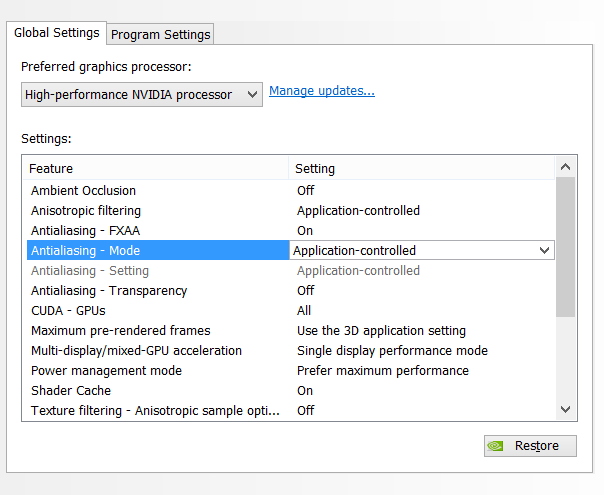
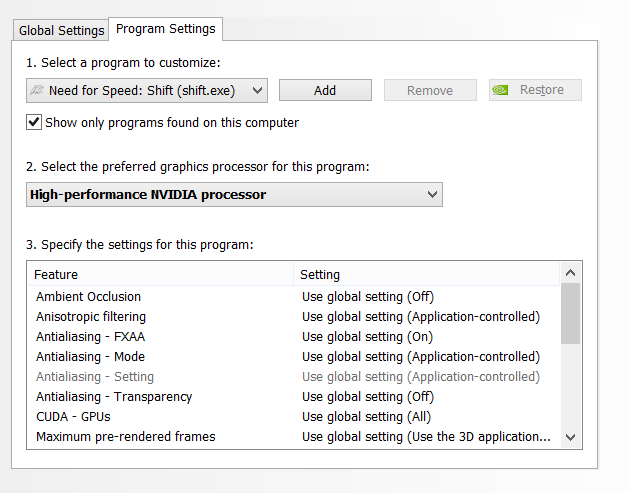
Thanks Bayn. I already have a profile set up there. Any specific settings i should change? I already changed it to prefer maximum performance.


MikeR said:
can I recommend that you double that ram at least you are running 64 bit so it will see it, or bump it all the way to 32 if you can.
theres not much else you can do to the graphics unless you get a new card for it...laptops are weak in that respect, are you at least running it on a cooler pad to get it cooled down a bit.

No offence but i'm not too sure how clued up you are..

The ram is not the problem as my usage never exceeds 6GB.

The graphics card is not the problem as I run Project Cars which is super demanding.

Thanks anyway:ty:


RAArmstrong@TheFanatics said:
Thats a pretty strong mobile card and the RAM is easily sufficient for NFS Shift. Do what Bayn46 said and create a profile in Nvidia Geforce Experience and let it run on the recommended settings there. See what happens...

Thanks for the reply.

He said to create a profile in Nvidia control panel. You are refering to Geforce Experience which alters the game settings. GFE sets the graphics settings ever higher and it runs slower :/
 

Pho3niX90

///Member
Check to make sure in your nvidia panel that it always tasks the GFX with physics. Download geforce experience as well, it does a good job of optimizing game specific settings and profiles

Sent from my SM-N9005 using Tapatalk
 

Donovan2412

///Member
Pho3niX90@OBDWorx said:
Check to make sure in your nvidia panel that it always tasks the GFX with physics. Download geforce experience as well, it does a good job of optimizing game specific settings and profiles

Sent from my SM-N9005 using Tapatalk

I do already have Geforce Experience installed. Optimizing actually makes it worse cause it sets the graphics higher.

Where do find that specific Physics settings?


untitled_4175022183.png
untitled1_5563854873.png
 

Pho3niX90

///Member
thats strange. Also. Since it's a laptop, go to power settings and make sure it's set to high performance. on 40fps it's def not a gfx issue. It seems more like a processor issue. So do the power settings first

Sent from my SM-N9005 using Tapatalk
 

Donovan2412

///Member
Pho3niX90@OBDWorx said:
thats strange. Also. Since it's a laptop, go to power settings and make sure it's set to high performance. on 40fps it's def not a gfx issue. It seems more like a processor issue. So do the power settings first

Sent from my SM-N9005 using Tapatalk

Read my OP.

Plugged in and on high performance.
 
Top