Fiber or Lte wireless

michael.joseph

Active member
r0ckf1re said:
michael.joseph said:
akash said:
I just installed fiber and there’s some things you should consider that I learnt last week. The routers work on two frequencies a 2ghz frequency and a 5ghz frequency.

The 2ghz frequency has a longer range but carries data at a slower speed.
The 5ghz Frequency has a shorter range but carries data at a faster rate.

However most devices only cater for a 2ghz frequency, our laptop at home only picks up a 2ghz frequency, including the PS4 surprisingly only picks up a 2ghz frequency. For the laptop I bought a TP-Link USB wifi adaptor dongle which now picks up the 5ghz frequency which allows me to enjoy the full 20mb line.

Depending on how big your house is you may want to also invest in a dual band wifi range extender as well.

Akash... sorry man- how to i go about finding out which devices work on which frequencies
Your device will only detect the frequency it can connect to.

Sent from my SM-N910C using Tapatalk


Cool... how do i check this
 

r0ckf1re

Well-known member
michael.joseph said:
r0ckf1re said:
michael.joseph said:
akash said:
I just installed fiber and there’s some things you should consider that I learnt last week. The routers work on two frequencies a 2ghz frequency and a 5ghz frequency.

The 2ghz frequency has a longer range but carries data at a slower speed.
The 5ghz Frequency has a shorter range but carries data at a faster rate.

However most devices only cater for a 2ghz frequency, our laptop at home only picks up a 2ghz frequency, including the PS4 surprisingly only picks up a 2ghz frequency. For the laptop I bought a TP-Link USB wifi adaptor dongle which now picks up the 5ghz frequency which allows me to enjoy the full 20mb line.

Depending on how big your house is you may want to also invest in a dual band wifi range extender as well.

Akash... sorry man- how to i go about finding out which devices work on which frequencies
Your device will only detect the frequency it can connect to.

Sent from my SM-N910C using Tapatalk


Cool... how do i check this
When you turn on your wireless on your device, you will only see what connections are available, if it supports 5g, you will see that as well as the 2g, if not then you will only see the 2g.

Sent from my SM-N910C using Tapatalk
 

akash

Well-known member
michael.joseph said:
akash said:
I just installed fiber and there’s some things you should consider that I learnt last week. The routers work on two frequencies a 2ghz frequency and a 5ghz frequency.

The 2ghz frequency has a longer range but carries data at a slower speed.
The 5ghz Frequency has a shorter range but carries data at a faster rate.

However most devices only cater for a 2ghz frequency, our laptop at home only picks up a 2ghz frequency, including the PS4 surprisingly only picks up a 2ghz frequency. For the laptop I bought a TP-Link USB wifi adaptor dongle which now picks up the 5ghz frequency which allows me to enjoy the full 20mb line.

Depending on how big your house is you may want to also invest in a dual band wifi range extender as well.

Akash... sorry man- how to i go about finding out which devices work on which frequencies

Most Smartphones work on a dual band frequency, you should be able to pick it up when searching to connect to the wifi.

You can check your laptop compatiblity by using the following steps

1. Click Start menu.

2. Press Windows key and R (at the same time). A run dialog will appear.

3. Type cmd in. Click Ok.

4. On the Command prompt window, type “netsh wlan show drivers“. Press Enter.

5. Look for the “Radio types supported” section.

If it says that the network adapter supports 802.11g and 802.11n network modes, it means that the computer has 2.4 GHz network capability only.


If it says that the adapter supports 802.11a and 802.11g and 802.11n network modes, it means that the computer has 2.4 GHz and 5GHz network capability.


If it says 802.11n 802.11g and 802.11b network modes, it means the computer has 2.4GHz network capability only.
 

AshG108

///Member
r0ckf1re said:
@Carmad

I see Cool Ideas is an approved ISP.

2018-01-29_10-28-49_9707140070.jpg


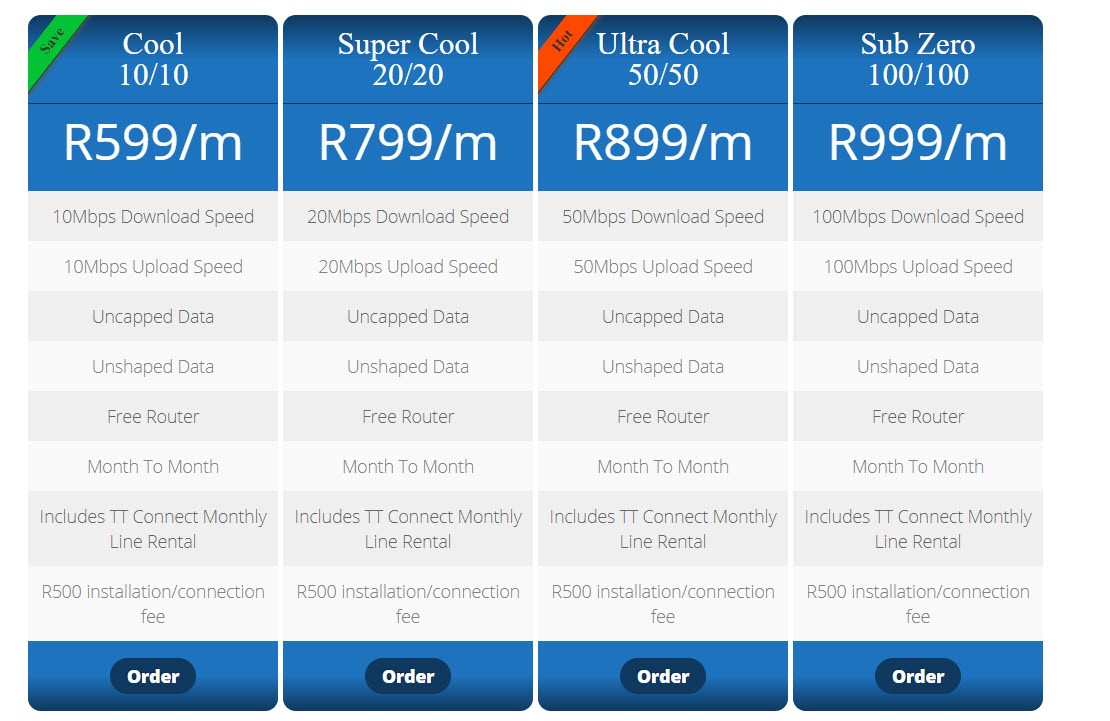
I would advise to go with them. I am currently using them, the service was great. The installation is R500 and the router is free using TT connect. All was free with Vumatel which I have. No throttling etc. No contract, its on month to month.

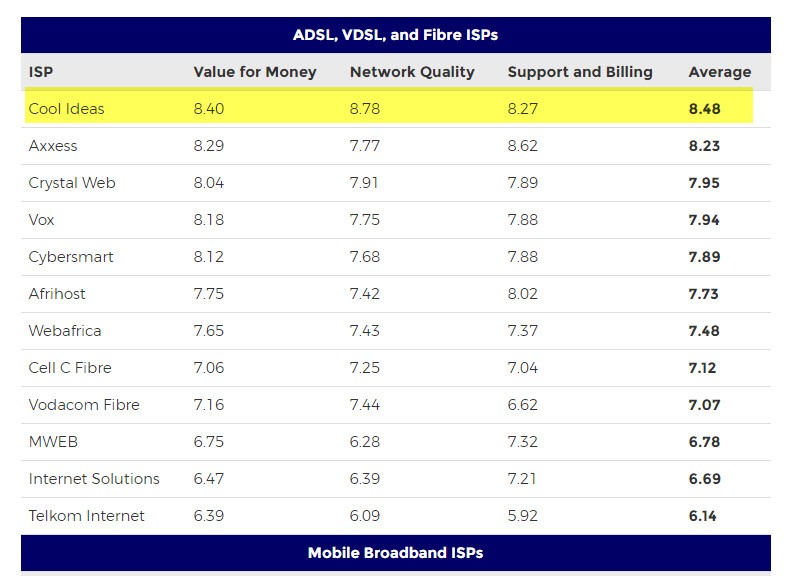
They are rated No.1 presently as per below.

2018-01-22_14-04-43_1856170822.jpg


These are their packages

2018-01-29_10-30-13_4922148520.jpg


Maybe give them a shout and get some feedback with regard to the install as per you explanation. I find it odd that they wish to charge you for the extra cabling.

Shot for that info, i should consider going onto fibre with them since that is cheaper than my LTE costs!
 

r0ckf1re

Well-known member
AshG108 said:
r0ckf1re said:
@Carmad

I see Cool Ideas is an approved ISP.

2018-01-29_10-28-49_9707140070.jpg


I would advise to go with them. I am currently using them, the service was great. The installation is R500 and the router is free using TT connect. All was free with Vumatel which I have. No throttling etc. No contract, its on month to month.

They are rated No.1 presently as per below.

2018-01-22_14-04-43_1856170822.jpg


These are their packages

2018-01-29_10-30-13_4922148520.jpg


Maybe give them a shout and get some feedback with regard to the install as per you explanation. I find it odd that they wish to charge you for the extra cabling.

Shot for that info, i should consider going onto fibre with them since that is cheaper than my LTE costs!
Anytime bru.

Sent from my SM-N910C using Tapatalk
 

Fastforward

New member
r0ckf1re said:
michael.joseph said:
akash said:
I just installed fiber and there’s some things you should consider that I learnt last week. The routers work on two frequencies a 2ghz frequency and a 5ghz frequency.

The 2ghz frequency has a longer range but carries data at a slower speed.
The 5ghz Frequency has a shorter range but carries data at a faster rate.

However most devices only cater for a 2ghz frequency, our laptop at home only picks up a 2ghz frequency, including the PS4 surprisingly only picks up a 2ghz frequency. For the laptop I bought a TP-Link USB wifi adaptor dongle which now picks up the 5ghz frequency which allows me to enjoy the full 20mb line.

Depending on how big your house is you may want to also invest in a dual band wifi range extender as well.

Akash... sorry man- how to i go about finding out which devices work on which frequencies
Your device will only detect the frequency it can connect to.

Sent from my SM-N910C using Tapatalk

:ty: good to know, wow I wasn't aware of the frequency issues - we're patiently waiting for fibre to be installed in our area...
 

yush1

Active member
I noticed in my area Vuma was the installer. I contacted them and wanted to go for the Vodacom package with 100gigs for R450 which they advertised on their website. Now they say they sold the rights to Vodacom and Vodacom has the same package for R600. They said the fibre is installed but not active and in the meantime, for the same price and data theyll give me a LTE router and switch automatically with the fibre is activated.:eek:mgwaiting:
 

ShaunB

Active member
I have telkom LTE and really happy with it.

Their new special this month is brilliant

Uncapped LTE + LIT decoder + wifi extender + LTE modem for something like R500?
 

Jerry_112

Member
I get 110gb LTE from MWeb for R549p.m. Speed is dependent on weather however it's a month to month contract which I prefer and it gets speeds of about 38mbps on a good day (they claim a top speed of 50mbps). Fibre is more stable / reliable however you have to pay extra for priority usage and even more to avoid shaping after a certain threshold. Each to their own regarding preference. :thumbs:
 

Preshen14

Events Organiser
ShaunB said:
I have telkom LTE and really happy with it.

Their new special this month is brilliant

Uncapped LTE + LIT decoder + wifi extender + LTE modem for something like R500?

What? Send me the link please, can't find it
 

r0ckf1re

Well-known member
Jerry_112 said:
I get 110gb LTE from MWeb for R549p.m. Speed is dependent on weather however it's a month to month contract which I prefer and it gets speeds of about 38mbps on a good day (they claim a top speed of 50mbps). Fibre is more stable / reliable however you have to pay extra for priority usage and even more to avoid shaping after a certain threshold. Each to their own regarding preference. :thumbs:

Not all have shaping, throttling. You just have to do your research.
Lots of month to month contracts on Fibre now as well, but you are correct, its all dependent on the each individual.
 

Nick

Honorary ///Member
Been on my 20/20 fibre for 2 months now, its the best thing ever.

No cap, no limiting just speed...
 

Preshen14

Events Organiser
To partially answer the original post and for gamers and guys that stream, etc.

Don't get fooled with 20 or even a 50MB packages. I noticed there are a lot of deals with 20MB download and 1MB upload. People get excited about this and take it, than wonder why it buffers.

Upload speed is what is important for any streaming and gaming (To name a few). Many people think download is everything.

My complex was done by Fibrehoods and were acquired by Vumatel if I am not mistaken. Well something like that, So I am lucky enough to chose from a range of ISP's with Vumatel. (Pray they laid down the fibre in your area)

For those who can, go onto the Vumatel website and look at the deal from Wiru-link.

It is 20MB download and 20MB upload uncapped fibre line - Free activation, Free installation, Month-to-Month term, for R799.00

It is slightly more than other ISP's that are offering 4/1MB but for around R200 extra, it would be highly worth it.
 
Top